


VLU SmartDrive™ Wireless CarPlay & Entertainment Adapter
VLU SmartDrive™ Wireless CarPlay & Entertainment Adapter
🚘 Go Wireless
🎬 Entertainment Built In
🔌 Simple USB Setup
Couldn't load pickup availability

VLU SmartDrive™ Wireless CarPlay & Entertainment Adapter

HOW TO USE
HOW TO USE
How to Use & Compatibility Guide
Before You Buy: Check Your Car First!
VLU SmartDrive™ is designed to upgrade compatible factory infotainment systems with wireless smartphone connectivity and built-in multimedia features.
YOUR VEHICLE MUST HAVE BOTH:
- A factory touchscreen display.
- Factory-wired Apple CarPlay or compatible factory-wired Android Auto, as supported by the specific device configuration.
⚠️ DO NOT BUY IF YOUR CAR IS NOT COMPATIBLE
VLU SmartDrive™ is NOT compatible with:
- Tesla vehicles
- BMW vehicles
- Vehicles without a factory touchscreen
- Vehicles that support only wireless factory CarPlay or wireless Android Auto
- Vehicles without the required compatible factory-wired connection
Important: If your car already has wireless-only CarPlay or Android Auto, this adapter is not designed for your system. Having Bluetooth, a USB port, or a touchscreen alone does not guarantee compatibility.
How to Check Compatibility
STEP 1 — Check Your Car's Screen
Turn on your vehicle and open its infotainment menu or settings. Look for Apple CarPlay or Android Auto.
STEP 2 — Test the Wired Connection
Connect your iPhone to your car's USB data port using a suitable USB cable. Confirm that Apple CarPlay launches through the cable. This helps establish whether your vehicle has factory-wired CarPlay.
STEP 3 — Confirm the Touchscreen
Make sure your factory infotainment system has a touchscreen. The RC23 is not designed for button-only, non-touchscreen systems.
Still unsure? Contact our customer support team before ordering and provide your vehicle's year, make, model, and infotainment system details.
How to Set Up VLU SmartDrive™
Step 1 — Connect the Adapter
Park your vehicle and connect VLU SmartDrive™ to the factory USB data port normally used for wired CarPlay or Android Auto.
Use the appropriate included USB cable for your vehicle's port. Avoid low-quality cables that may prevent a reliable connection.
Step 2 — Pair Your Phone
Turn on Bluetooth and Wi-Fi on your compatible iPhone or Android phone. Follow the adapter's on-screen instructions to establish the connection.
Select the supported connection mode for your vehicle and phone.
Step 3 — Choose Your Experience
Once connected, use the adapter's interface to access the available features:
- Wireless Apple CarPlay: For compatible iPhones and supported factory systems.
- Wireless Android Auto: For compatible Android phones and supported system configurations.
- Built-in multimedia apps: Access supported pre-installed apps on the applicable device version.
- Phone screen mirroring: Mirror supported phone content using a compatible mirroring method.
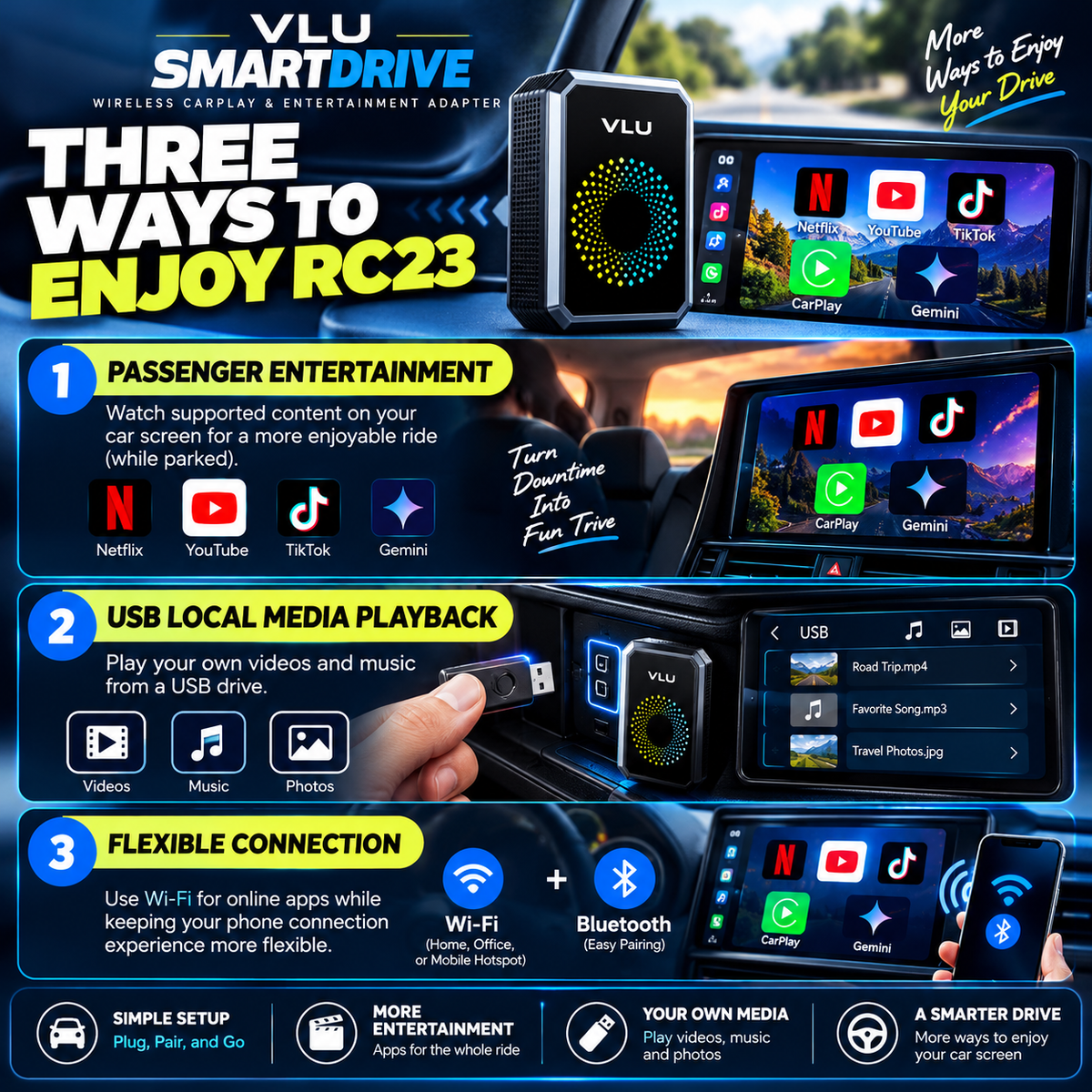
- USB media playback: Play supported local videos and music from a USB drive.
Features vary by vehicle, phone, software version, app and connection method.
Enjoy Built-In Entertainment Apps
The supported VLU SmartDrive™ RC23 version comes with pre-installed apps such as:
- Netflix
- YouTube
- TikTok
- Gemini
How to Use Online Apps
- Open the adapter's settings.
- Connect to a working Wi-Fi network or your phone's personal hotspot.
- Open the available app you want to use.
- Sign in with your own account when required.
- Enjoy supported content while your vehicle is parked.
Internet and subscriptions: Wi-Fi or a phone hotspot is required for online apps. Internet service, mobile data, personal accounts and paid subscriptions are not included. Gemini requires a Google account.
App availability: Available apps and content may vary by software version, account, region and service provider.
Important app limitation: The RC23 uses a closed system. Its “AppStore” icon is intended for updates to selected pre-installed apps, not unrestricted downloading and installation of additional apps.
Phone Screen Mirroring
VLU SmartDrive™ supports screen mirroring on compatible devices.
For iPhone Users
Use AirPlay with a compatible iPhone and follow the adapter's on-screen mirroring instructions.
For Android Users
Use the supported screen-mirroring method for your compatible Android device and follow the on-screen instructions.
Vertical and Landscape Content
- Vertical content: Portrait-oriented content generally remains vertical on the car display.
- Landscape content: For landscape mirroring, rotate your phone to landscape and use content that supports landscape orientation.
The display ratio and screen fill may vary depending on your phone, app, content format and orientation.
Protected content disclaimer: Some streaming services restrict screen mirroring because of digital rights management (DRM) or HDCP protection. An app interface may appear while protected video content displays a black screen or plays audio only.
Play Your Own Media Through USB
Want another way to enjoy your media while parked?
VLU SmartDrive™ supports playback of compatible local videos and music from a USB drive.
- Prepare a USB drive containing supported media files.
- Connect the drive using the supported USB connection.
- Open the available local media playback interface.
- Select a compatible video or music file.
Playback depends on the file format and device support. USB media playback does not require online streaming for files stored locally.
Troubleshooting & Helpful Tips
The adapter will not connect
- Confirm that your vehicle has factory-wired CarPlay or a supported wired Android Auto configuration and a factory touchscreen.
- Verify that you are using the correct USB data port.
- Check that the correct cable is connected.
- Follow the on-screen pairing instructions.
Online apps will not open
- Confirm that the adapter is connected to working Wi-Fi or your phone's hotspot.
- Check your internet connection.
- Sign in to your account when required.
- Check whether the app requires a paid subscription or additional permissions.
The adapter feels slow
- Close unused background apps.
- Clear the cache of supported apps when needed, especially Gemini after use.
- Restart the adapter after extended use if performance slows.
Mirroring shows a black screen
- Check whether the app or content provider restricts screen mirroring.
- Try compatible, unprotected content.
- Confirm that your phone and the selected mirroring method are supported.
Backup camera behavior
The product listing reports that the vehicle's backup camera can continue functioning while the adapter is connected. Actual behavior depends on your vehicle's existing infotainment system and configuration.
What's Included?
The listed RC23 package contains:
- 1 × Multimedia adapter
- 1 × USB-A-to-USB-C cable
- 1 × USB-C-to-USB-C cable
- 1 × Reset pin tool
- 1 × User manual
Please verify the contents against the specific version supplied with your order.
Safety Disclaimer
Video entertainment is intended for use while parked. Never watch videos, browse entertainment apps or interact with streaming content while driving. Drivers must remain attentive to the road and follow applicable traffic laws.
Final Compatibility Reminder
Before placing your order, verify that your vehicle has a factory touchscreen and the required factory-wired CarPlay or supported wired Android Auto connection.
DO NOT PURCHASE IF YOUR VEHICLE IS INCOMPATIBLE. Tesla, BMW, non-touchscreen systems and vehicles with wireless-only factory CarPlay or Android Auto are excluded from the supported configuration described above.
If you are unsure, contact VLU customer support before purchasing. Providing your vehicle's year, make, model and infotainment details can help you check compatibility before you order.
VLU SmartDrive™ — Make more of the screen you already own.
SATISFACTION GUARANTEE
SATISFACTION GUARANTEE
SATISFACTION GUARANTEE
Your Satisfaction Is Our Priority!
At VLU, we believe upgrading your driving experience should be simple, convenient, and worry-free.
Every VLU SmartDrive™ adapter is designed to bring wireless connectivity and entertainment features to compatible vehicles without replacing your factory screen.
Why Shop With Confidence?
✅ Quality You Can Trust — We aim to deliver reliable products that make everyday life more convenient.
✅ Easy Setup Support — Need help connecting your adapter? Our customer support team is here to guide you.
✅ Dedicated Customer Care — If you experience an issue with your order, contact us and we'll help you find a solution.
✅ Hassle-Free Assistance — Eligible returns and refunds are handled according to our published return policy.
⚠️ Important Compatibility Reminder
VLU SmartDrive™ requires a compatible factory-wired CarPlay system and factory touchscreen. It is not compatible with Tesla, BMW, non-touchscreen systems, or vehicles with wireless-only factory CarPlay.
Please verify compatibility before purchasing.
Your satisfaction matters to us. We're here to help you get the most out of your VLU SmartDrive™ experience!
SHIPPING & RETURNS
SHIPPING & RETURNS
FREE SHIPPING & DELIVERY 🚚
Your Upgrade Ships Free — No Extra Shipping Costs!
Enjoy your VLU SmartDrive™ without worrying about additional shipping fees. We offer FREE SHIPPING on every order!
📦 Order Processing
Your order will be prepared for shipment after purchase. Processing times may vary depending on order volume.
🚚 FREE SHIPPING
Shipping is on us! No additional shipping fees will be charged for eligible orders.
📍 Track Your Order
Once your order ships, tracking information will be provided when available so you can follow your package.
💬 Need Help?
Have questions about your delivery? Contact our customer support team with your order number, and we'll be happy to assist.
Please Note: Delivery times may vary due to carrier delays, weather, or other circumstances outside our control. Please double-check your shipping address at checkout to help avoid delivery issues.
VLU SmartDrive™ — Upgrade your drive. We'll cover the shipping.
FAQ
FAQ
FREQUENTLY ASKED QUESTIONS
1. Will VLU SmartDrive™ work with my car?
Your vehicle must have a factory touchscreen and factory-wired Apple CarPlay or a supported factory-wired Android Auto system. Tesla, BMW, non-touchscreen systems, and vehicles with wireless-only factory CarPlay or Android Auto are not compatible with this RC23 configuration.
Please verify compatibility before purchasing.
2. Does it work with iPhone and Android?
Yes, the RC23 supports wireless Apple CarPlay and Android Auto on compatible phones and vehicle systems. Available features depend on your device and vehicle configuration.
3. Can I watch Netflix, YouTube, or TikTok?
The supported RC23 version includes pre-installed Netflix, YouTube, and TikTok apps. A working Wi-Fi connection or phone hotspot is required, and you may need to sign in to your own account.
For safety, video entertainment should only be used while parked.
4. Does it require Wi-Fi?
Yes, online entertainment apps require a working Wi-Fi connection or your phone's personal hotspot. Mobile data charges may apply when using your phone's hotspot.
5. Are subscriptions included?
No. Internet service, personal app accounts, paid subscriptions, and third-party content are not included. Some apps or content may require separate subscriptions.
6. Can I install additional apps?
The RC23 uses a closed system and does not support unrestricted installation of additional apps. Available pre-installed apps and update options depend on the software version.
7. Does it support screen mirroring?
Yes, phone mirroring is supported for compatible devices, including AirPlay for compatible iPhones. Some protected streaming content may not display because of restrictions imposed by the content provider.
8. Can I play videos or music from a USB drive?
Yes, the adapter supports compatible local video and music playback from a USB drive. Playback depends on supported file formats and device compatibility.
9. Is installation difficult?
The adapter connects through a compatible factory USB data port. Follow the on-screen pairing instructions and ensure Bluetooth and Wi-Fi are enabled on your phone. Setup may vary by vehicle and phone.
10. Will my factory backup camera still work?
Backup-camera functionality may continue operating while the adapter is connected, but actual behavior depends on your vehicle's existing infotainment system and configuration.
11. Is shipping free?
Yes! We offer free shipping on every order. Your estimated delivery window and available tracking information will be provided through the applicable order and shipping updates.
12. How can I track my order?
Once your order ships, tracking information will be provided when available. Use the tracking details in your shipping confirmation to follow your package.
13. What if the adapter doesn't connect?
First, verify your vehicle's compatibility, check that you are using the correct USB data port and cable, and follow the pairing instructions. For online apps, confirm that your Wi-Fi or hotspot connection is working. Contact customer support if you need additional assistance.
14. What comes in the box?
The listed package includes the multimedia adapter, USB-A-to-USB-C cable, USB-C-to-USB-C cable, reset pin tool, and user manual. Contents may vary by the specific product version supplied.
15. What if I have questions or need help?
Contact our customer support team with your order number and a description of your issue. We'll help you troubleshoot your connection or explain the available options under our published return and warranty policies.
Still unsure if your car is compatible?
Check your vehicle's year, make, model, factory touchscreen, and wired CarPlay or Android Auto support before ordering.
VLU SmartDrive™ — A smarter way to use your compatible factory screen.


Over 100,000+ Happy Customers

One Compact Adapter. More Ways to Connect.
Make more of your factory touchscreen with VLU SmartDrive™. Designed for compatible vehicles, this compact adapter brings together wireless Apple CarPlay or Android Auto, built-in entertainment apps, phone screen mirroring, and USB media playback.
Connect wirelessly
Enjoy compatible CarPlay or Android Auto without plugging your phone in every time.
Entertainment built in
Access supported Netflix, YouTube, TikTok, and Gemini apps on the applicable RC23 version.
Mirror compatible content
Display supported phone content through compatible screen-mirroring features.
Play your own media
Enjoy supported local videos and music from a USB drive.
Simple USB connection
Connect through your vehicle's compatible factory USB data port and follow the pairing instructions.
Upgrade Your Screen. Keep Your Dashboard.
No need to replace your factory display just to add supported connectivity and multimedia features.
IMPORTANT COMPATIBILITY NOTICE: Your vehicle must have a factory touchscreen and compatible factory-wired CarPlay or supported wired Android Auto. Tesla, BMW, non-touchscreen systems, and vehicles with wireless-only factory CarPlay or Android Auto are not compatible with this RC23 configuration.
Internet access, app logins, and subscriptions may be required. Video entertainment is intended for use while parked.

Make Every Parked Moment More Enjoyable.
Waiting for someone? Taking a break between errands? VLU SmartDrive™ adds multimedia possibilities to your compatible factory touchscreen, so you can enjoy supported entertainment without replacing your dashboard.
🎬 Built-In Streaming Apps
Access supported Netflix, YouTube, and TikTok apps on the applicable RC23 version.
📶 Connect Your Way
Connect the adapter to Wi-Fi or your phone's personal hotspot to access online features.
👤 Your Accounts, Your Content
Sign in with your own account when required. Some apps and content may require paid subscriptions.
✨ Gemini Access
The supported version includes Gemini. Connect to the internet and sign in with a compatible Google account to get started.
Entertainment When You're Parked. Convenience Every Day.
Whether you're taking a break or waiting for pickup, make more use of your existing factory screen with supported multimedia features.
PLEASE NOTE: Internet service, mobile data, personal accounts, subscriptions, and third-party content are not included. App availability varies by software version, account, region, and service provider. Video entertainment is intended for use while parked.

A Compact Upgrade Without the Dashboard Makeover.
Why replace your existing infotainment system when you can add more functionality to a compatible one? VLU SmartDrive™ is designed to bring wireless connectivity and multimedia features to your factory touchscreen through a compact USB-connected adapter.
🚗 Keep Your Original Display
Continue using your existing factory touchscreen without installing a separate dashboard display.
🔌 Compact USB Connection
Connect through your vehicle's compatible USB data port and follow the on-screen pairing instructions.
📱 Wireless Phone Connectivity
Enjoy supported wireless Apple CarPlay or Android Auto, depending on your vehicle and phone configuration.
🎵 More Ways to Enjoy Media
Access supported pre-installed entertainment apps, compatible phone mirroring, and local media playback from a USB drive.
Small Device. More Connected Possibilities.
Designed for drivers who want more from the technology already built into their vehicle, VLU SmartDrive™ brings multiple supported features together in one compact adapter.
IMPORTANT: Your vehicle must have a factory touchscreen and compatible factory-wired CarPlay or supported wired Android Auto. Tesla, BMW, non-touchscreen systems, and vehicles with wireless-only factory CarPlay or Android Auto are not compatible with this RC23 configuration.
Online apps require an internet connection and may require personal accounts or subscriptions. Features vary by vehicle, phone, and software version.
A Smarter Way to Upgrade Your Car
| VLU | Others | |
|---|---|---|
| Wireless Apple CarPlay | ||
| Wireless Android Auto | ||
| Built-in entertainment apps* | ||
| Compatible phone screen mirroring | ||
| USB media playback |